Device-verified on iPhone and iPad.Device-verified end to end on iPhone and iPad.
The cockpit panel for your sim.
Turn your iPad or iPhone into a tactile radio stack for MSFS 2024.
$12.99
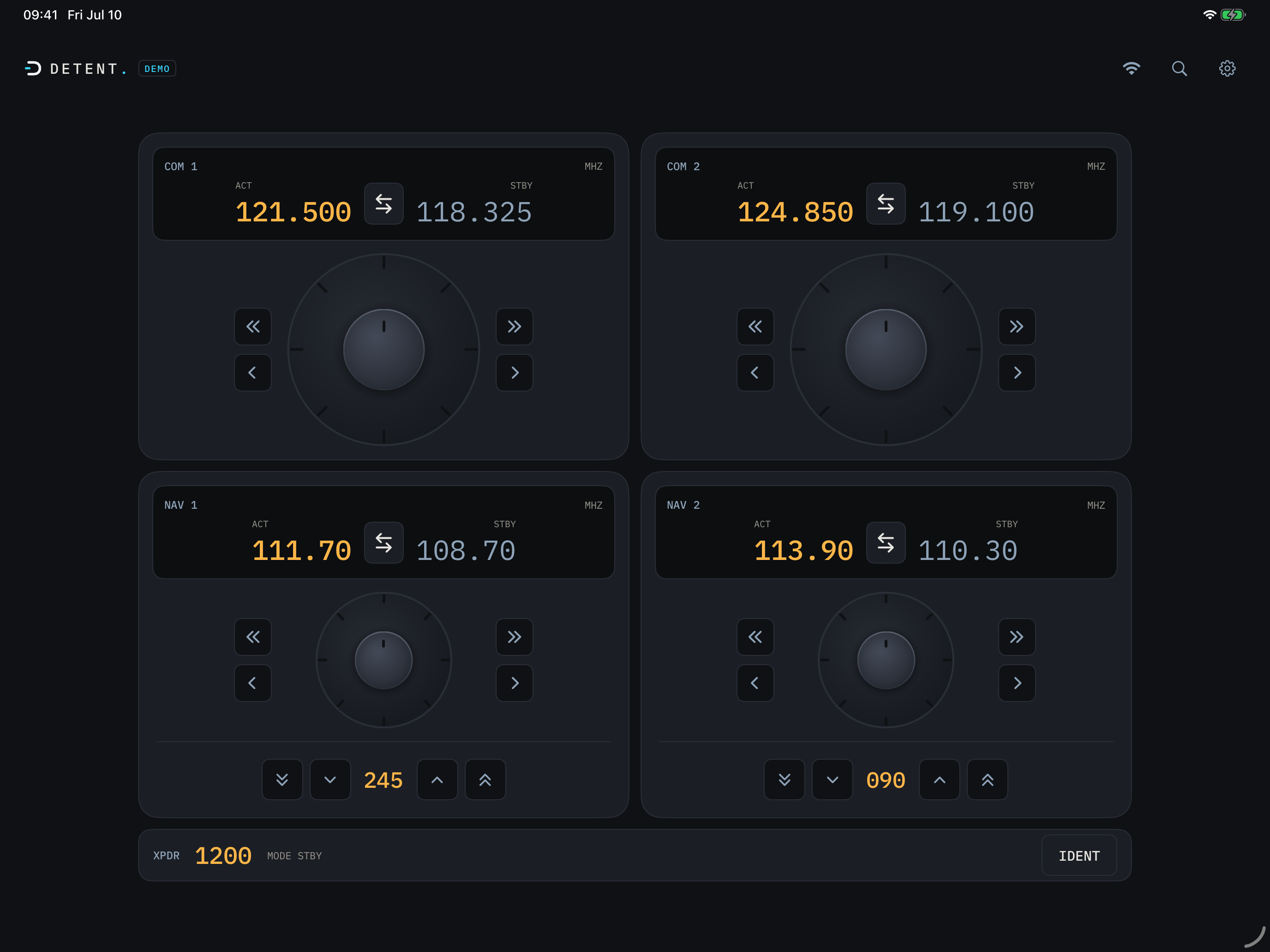
It starts with your radios. DETENT turns your iPad or iPhone into a tactile radio stack for Microsoft Flight Simulator 2024: spin real concentric knobs, feel every detent click, and watch the cockpit follow. It already runs the radios end to end on real hardware.
No account. No subscription. No cloud.
- Price: $12.99 one-time
- Simulator: MSFS 2024
- Devices: iPhone + iPad
- Platform: Windows PC only
Fly the airplane, not the mouse.
Every time you reach for the mouse to tune a radio, you leave the cockpit. DETENT puts the knobs back under your fingers: spin, feel the detent, swap, and you never break the flight.
Overview
See it work
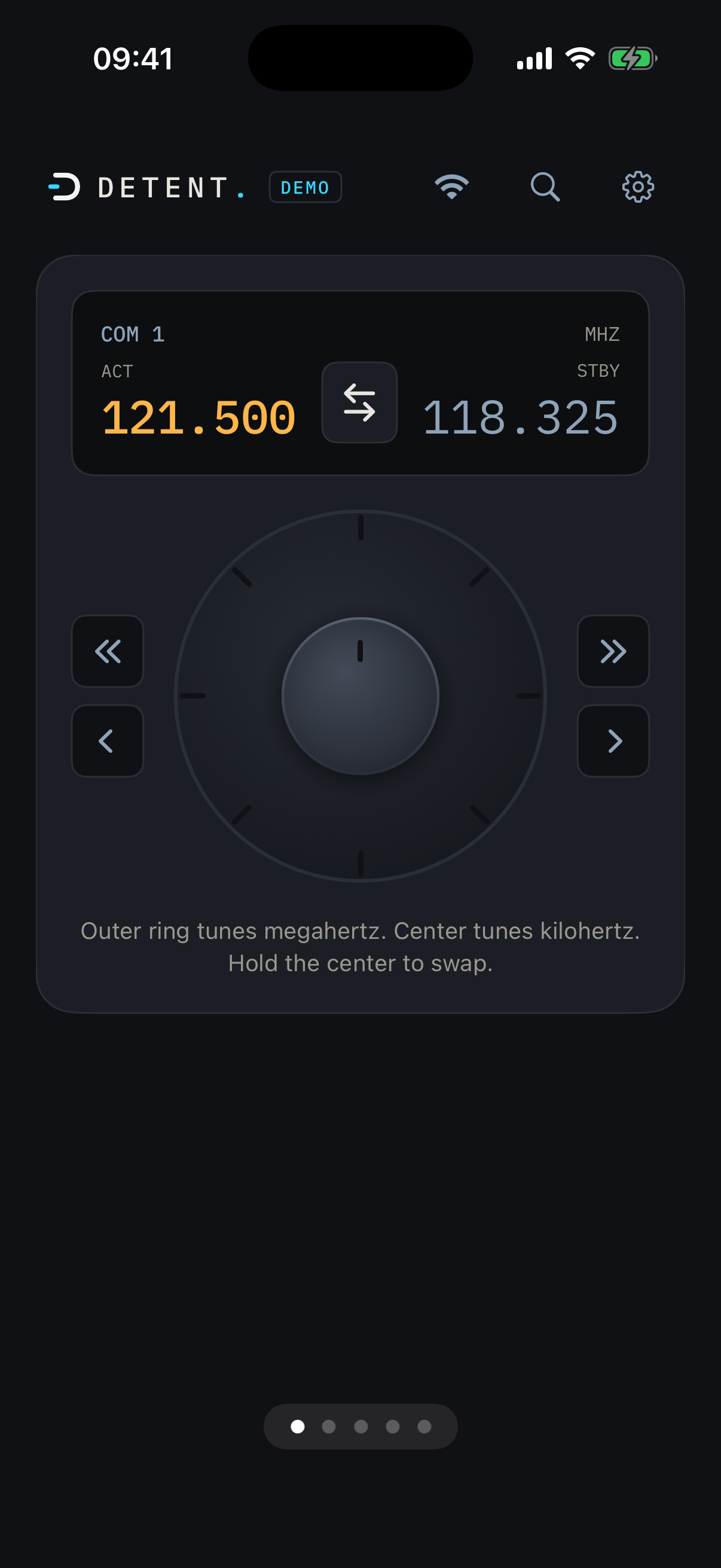
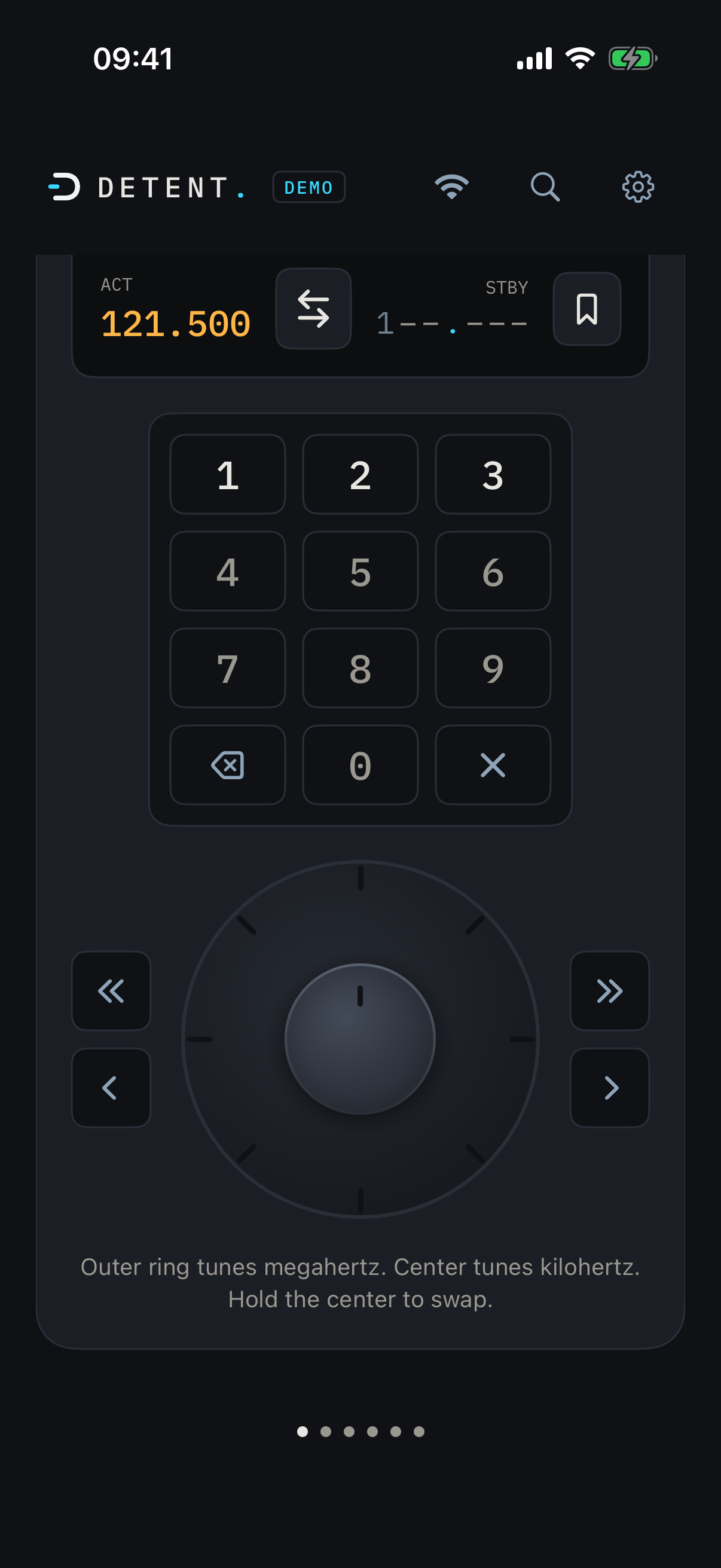
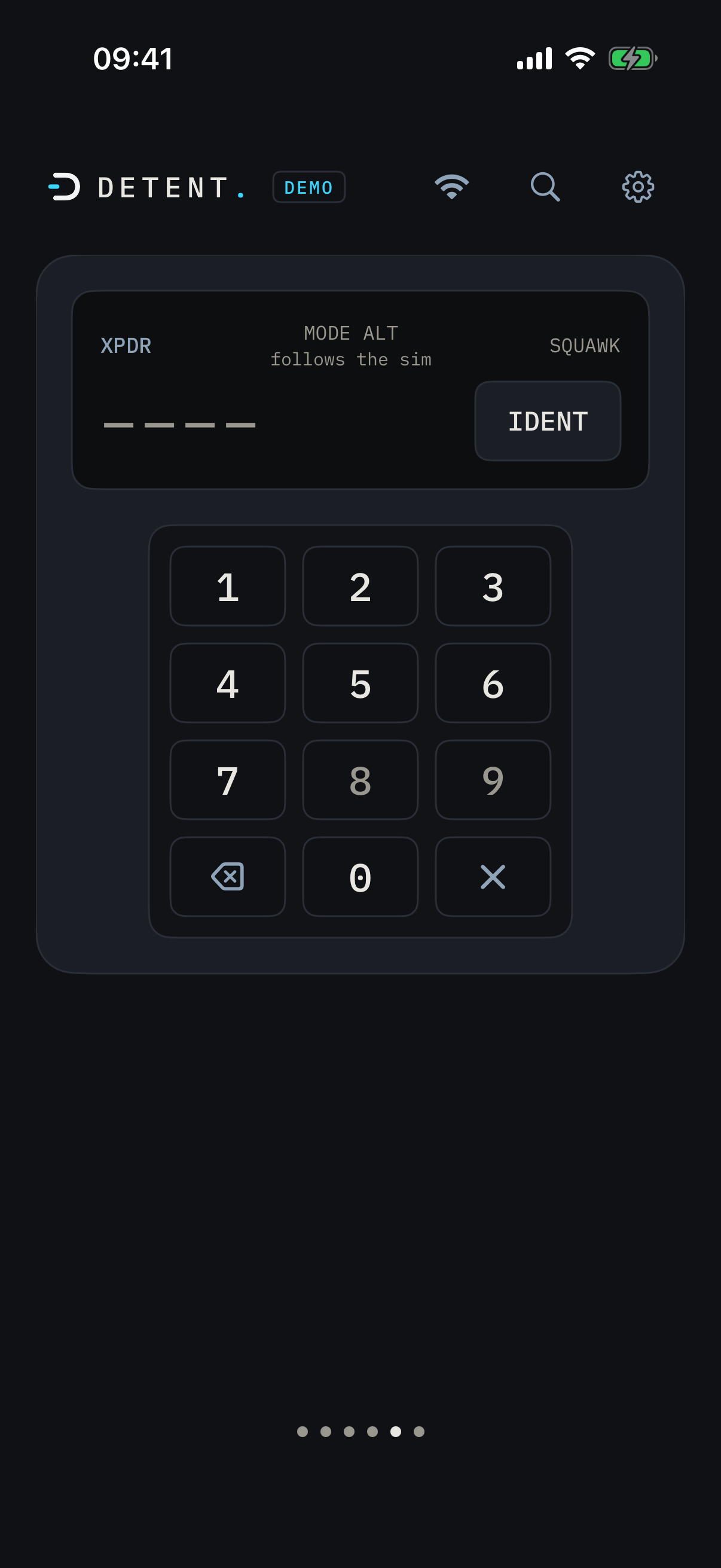
The same instrument on both devices. One radio at a time on iPhone, the full stack on iPad.
How the knob works
Outer ring tunes MHz. Inner ring tunes kHz. Hold the inner ring still to swap active and standby.
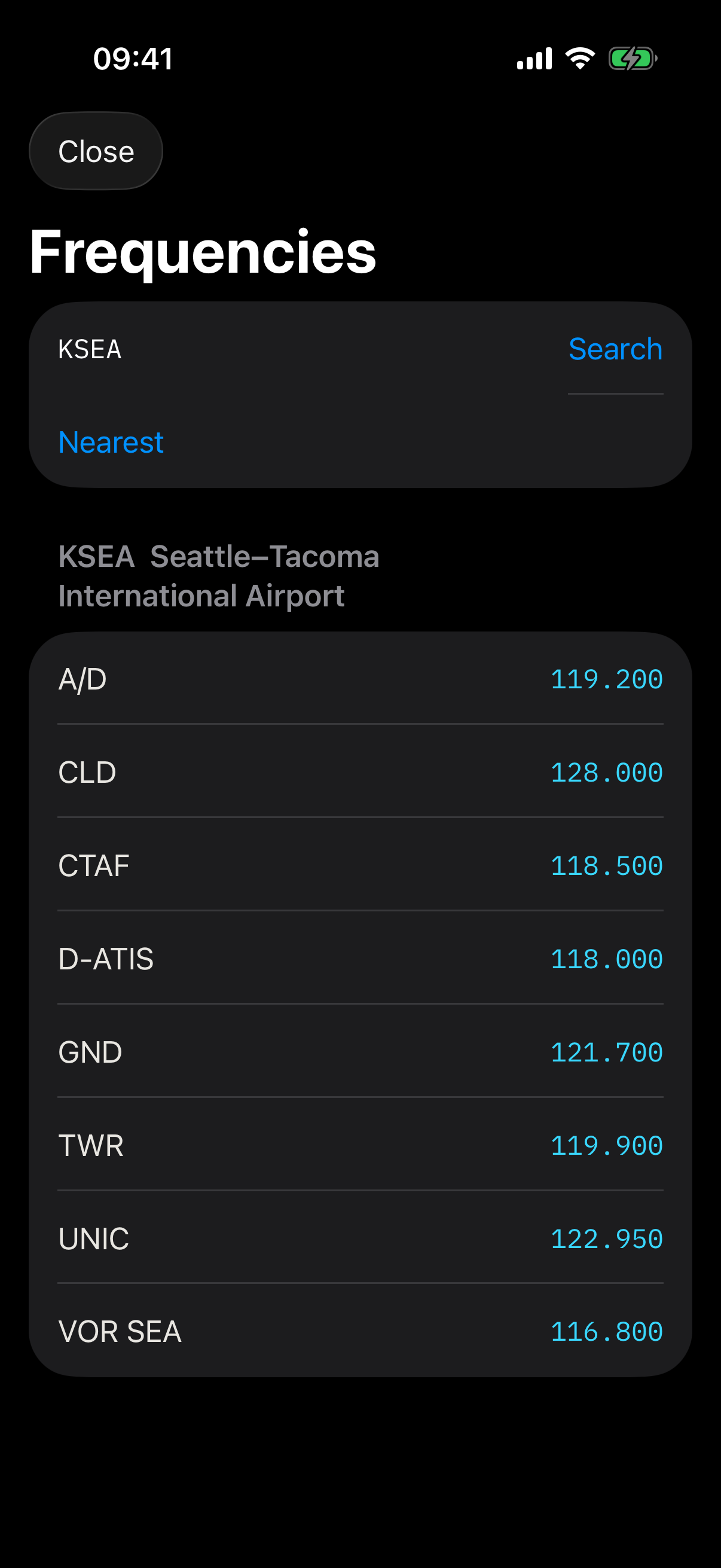
Airport lookup
Every frequency, one tap away
Search any airport by identifier, or let DETENT find the nearest one to you in the sim. COM and VOR frequencies come straight from a bundled offline database. Tap one and it drops into standby, ready to swap.
For online flyers
Made for live and AI ATC
Fly VATSIM, PilotEdge, BeyondATC, or SayIntentions and the handoffs come fast. Hear the frequency, spin it into standby, swap, and you're talking. Tap an airport for ground, tower, and approach in one place, monitor COM2 while you work COM1, and switch to 8.33 kHz spacing when you need it.
The handoff loop
- Hear itA controller hands you a frequency.
- Spin itDial it into standby by feel, eyes outside.
- SwapOne press makes standby active.
- TalkingYou're on frequency and back to flying.
- Hear itA controller hands you a frequency.
- Spin itDial it into standby by feel, eyes outside.
- SwapOne press makes standby active.
- TalkingYou're on frequency and back to flying.
- VATSIM
- PilotEdge
- BeyondATC
- SayIntentions
Workflow
How it works
One small program on your sim PC. No accounts, no cloud relay, no configuration files. Your phone talks to your PC over your own Wi-Fi and nothing leaves your network.
- 01
Install the bridge
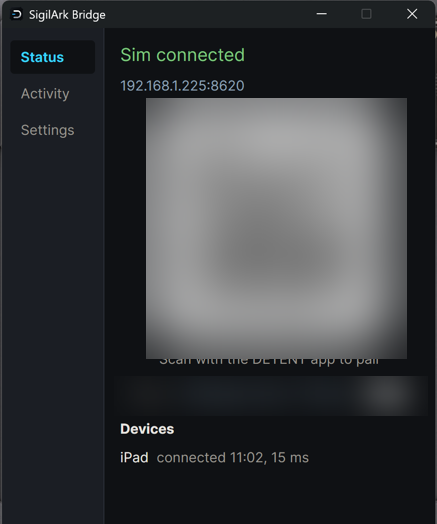
Install the SigilArk Bridge from the Microsoft Store on the PC that runs Microsoft Flight Simulator 2024. It opens with a pairing window, then lives in your system tray while you fly, showing every radio change as it happens. Launch it before or after the sim; it connects on its own.
- 02
Pair your device
Open DETENT on your iPad or iPhone. It finds the bridge on your Wi-Fi automatically, or scan the QR code the bridge shows. Pair once and it reconnects on its own after that, even when your PC's address changes or the connection drops mid-flight.
- 03
Tune
Spin the knob, feel the detents, and the radios in your cockpit move. What you see on the panel is read live from the sim, always.
DETENT works with Microsoft Flight Simulator 2024 on PC. Xbox is not supported: the sim only exposes its radio controls to software running on a PC.

Pairing
One scan and you're in
Open DETENT and the Connect screen lists the bridges it finds on your Wi-Fi. Pair once and it reconnects on its own after that, even when your PC's address changes or the connection drops mid-flight.
On your PC
The bridge is a real app
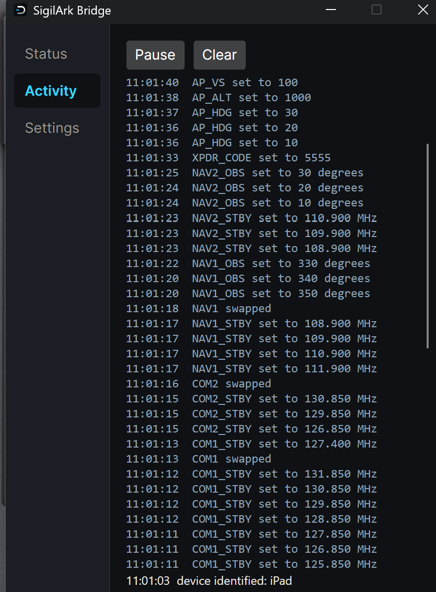
Not a console window you forget about. The SigilArk Bridge opens with a pairing window, tucks into your system tray while you fly, and shows every radio change as it happens.
See every tune
The Activity view lists each radio change as it lands, and calls out each device by name as it connects.
Know your round trip
Live latency next to each connected device, the same measured number the site shows.
Reconnects on its own
Pair once. If the connection drops, your device retries on its own until it heals, even mid-flight.
Quits with the sim
Leave it running in the tray, or set it to close itself when the sim does.
Workflow
Install once, pair over Wi-Fi
A small app runs in your PC's system tray and talks to DETENT over your own Wi-Fi. Pair once and it reconnects on its own after that, even mid-flight.
See the full setup guide →The gesture
How the knob works
One knob, two rings. The outer ring is the big number, the inner ring is the small one, and holding the inner ring still for a beat trades what is active for what is standby.
The diagram's numbered callouts match the numbered list below: 1 is the outer ring, 2 is the inner ring, which you spin for kHz or hold still to swap active and standby.
- Outer ring
MHz. The whole-number part of the frequency.
- Inner ring
kHz, or hold to swap. Spin it for the decimals, in 25 or 8.33 kHz steps. Hold it still to trade active and standby. A dedicated swap button does the same in one tap.
Advantages
Why DETENT
Why DETENT, in full
Companion apps usually mean button grids that fake keystrokes, or a browser tab that feels like a web page. DETENT is built like an instrument.
Response time
30ms
Measured on a local network, request to cockpit echo. Typically 13 to 44 ms.
Always live, both ways
Every frequency on the panel is read directly from the sim, continuously. Change a radio in the cockpit and DETENT shows it instantly. No blind one-way buttons, ever. If the link drops, it reconnects on its own.
Detents you can feel
Each knob step lands with a crisp haptic click, synchronized to the visual snap. Spin fast and it accelerates like real Garmin hardware.
Instant response
Your input applies on the panel immediately and reaches the cockpit before you can blink. Measured, not guessed.
Airport frequencies built in
Search any airport or find the nearest, then tap a COM or VOR frequency straight into standby. The database is bundled and offline.
Buy once, own it
One price, one purchase. No subscription, no tiers, no account to create, no server DETENT depends on.
Radios, done right
COM, NAV, OBS, and transponder, plus an autopilot page in Beta. Deliberately nothing more. Depth over sprawl: every control earns its place and works across aircraft. On iPad, all of it fits on one screen, no scrolling.
Try the feel
Try it: drag the outer ring for megahertz, the center for kilohertz.
Compatibility
Out of the box
DETENT works out of the box with any aircraft that uses Microsoft Flight Simulator's standard radios. That covers most general aviation aircraft, the stock airliners, and many others, with no setup.
Verified at launch
- Cessna 172 SkyhawkG1000
- Cessna 208B Grand Caravan EXG1000
- Daher TBM 930G3000
- Airbus A320neoRMP / standard radios
- Boeing 737 MAX 8FMS / standard radios
- Boeing 787 DreamlinerFMS / standard radios
- Classic steam-gauge aircraftTraditional radio stack
Heavily customized or payware aircraft may need a profile. Profiles are added on request, and the list of supported aircraft grows over time.
Roadmap
What's next
DETENT ships focused and grows deliberately. Here is where it is headed.
Autopilot (Beta)
Heading, altitude, and vertical speed bugs plus the core modes, tuned by feel. Live now for supported GA aircraft, in Beta while aircraft coverage grows.
Autopilot, out of beta
Wider aircraft coverage graduates the panel from Beta into a stable core feature.
Writable transponder mode
Set STBY, ON, ALT, and GND from the panel, not just the squawk code and ident.
Worldwide ILS frequencies
Read localizer and glideslope frequencies from the sim's own navigation data, anywhere in the world.
X-Plane support
A second simulator, planned after the initial release. X-Plane will not even need the bridge program.
More aircraft profiles
The launch set covers the common trainers and turboprops. Profiles grow based on what the community flies.
The people
What simmers are saying
Reviews from the flight sim community will land here as pilots get their hands on DETENT.
DETENT is made by Dayel Ostraco, a GA pilot and simmer for over 20 years.
Support
FAQ
- What does the bridge look like?
- The SigilArk Bridge is a small Windows app, not a console window. It opens with a pairing window showing a QR code, then sits in your system tray while you fly. Open it any time to watch an Activity feed of every radio change, or check your connected devices, each listed by name with its live round-trip latency. No configuration files to edit.
- How do I get the bridge?
- SigilArk Bridge installs from the Microsoft Store, the same way as any other Windows app. Find it on the download page, install it on the PC that runs your sim, and the Store keeps it updated automatically after that.
- Does it work on Xbox, PlayStation, or other consoles?
- No. DETENT needs the free SigilArk Bridge running on a Windows PC, and Microsoft Flight Simulator only exposes its radio controls (SimConnect) to software on that PC. It does not run on the Xbox version of the sim, on PlayStation, or on any other console. You need the Windows PC version of the simulator. If that ever changes, DETENT will be first in line.
- What about X-Plane?
- Planned. X-Plane support is on the roadmap after the initial release, and it will not even need the bridge program.
- Does it work with payware aircraft?
- Many will work out of the box because DETENT speaks the sim's standard radio controls. Some heavily customized aircraft need a profile; profiles are added based on demand.
- How much does it cost?
- A one-time purchase of $12.99. No subscription and no in-app purchases. And if it does not feel right with your setup, Apple makes App Store refunds easy; no hard feelings.
- Where do I get it?
- DETENT is available now. Get the app from the App Store for your iPhone and iPad, then install the free SigilArk Bridge from the Microsoft Store on the PC that runs your sim. The download page has the bridge link and the setup steps.
- What data does DETENT collect?
- None. There is no account, no analytics, and no cloud service. Your phone talks to your PC on your own network and that is the whole story.